
Woot! has no price alerts. Its app can tell you when a Woot-Off starts, but not when an air fryer drops under $80 or a brand you like hits 40% off. For that, you need a saved search that watches Woot! for you. This guide shows how to set one up in WootyWatch, BetterWoot's sister site, which is free for personal use.
What Woot! offers on its own
The Woot! app's notifications cover Woot-Offs, the daily deal, app-only deals, and promotions. There's no setting for a product, a brand, a price, or a restock. (See Woot! app notifications.)
Without an alert, the closest thing is a bookmarked search. BetterWoot Search keeps every search in the page's address, so you can bookmark, say, air fryers under $80, still in stock and check it whenever you like. That needs no account, but you have to remember to look.
How to set up a Woot! price alert
- Go to WootyWatch's alert builder. You can also search on WootyWatch first and press Create alert to start from that search.
- Pick what to look for. Type keywords, and choose whether a deal needs all of them, the exact phrase, or any one. Add words to leave out, like "case, cable" when you want the phone itself. Choose whether to search titles only or descriptions too.
- Narrow it down. Set a price limit, a minimum discount off Woot!'s list price, a condition (New, Refurbished, Open box, or Used), and any of Woot!'s stores. Or start from a template: something under a price, a target price, a Bag of Crap, or any Woot-Off item.
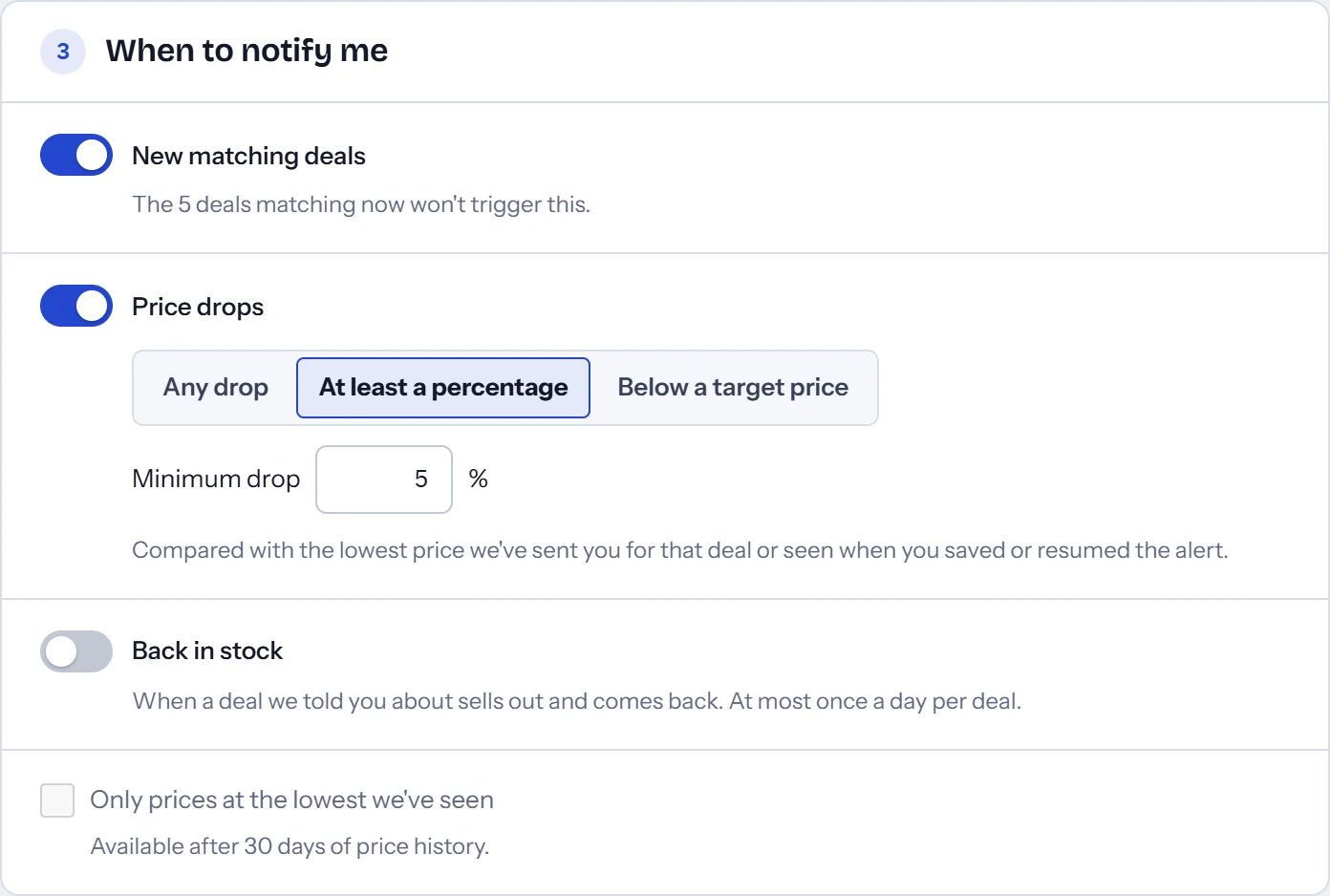
- Choose when to hear about it. New matching deals and price drops of 5% or more are on to start. A price drop can be any drop, a percentage, or a target price. Back in stock is off until you turn it on.
- Choose where to send it. Email comes first. After you sign in, you can add browser push, Discord, and Telegram.
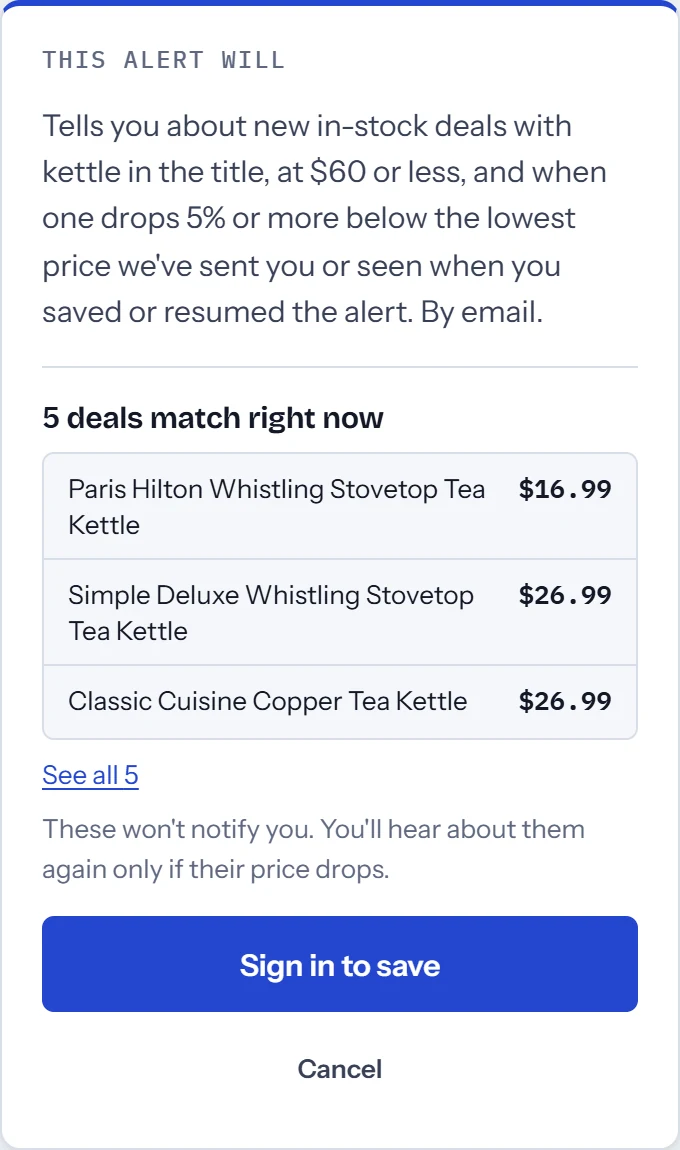
- Sign in to save. There's no password: WootyWatch emails you a code and a link, and keeps your choices while you sign in.
What to expect once it's saved
- Deals that already match stay quiet. They become the alert's starting point. One of them can still message you later if its price drops.
- Price drops only go lower. Once you've been told about a price, the alert waits for a lower one. A price going up never sends anything.
- Relists don't repeat themselves. Woot! often lists the same product again as a new deal. If you heard about it in the last seven days, a relist at the same or a higher price stays quiet.
- Sellouts are silent. An alert only tells you about deals you can buy. With Back in stock on, you'll hear when a deal you were told about returns, at most once a day.
- Several matches arrive together, in one message per check. If you set quiet hours, push, Discord, and Telegram messages wait until they end. Email can be instant or a daily digest.
Alerts worth setting up
- One product under a price:
"ice maker" price<200finds that exact phrase at under $200. - A brand at a real discount:
dyson off>=40finds Dyson deals at least 40% below Woot!'s list price. - Refurbished in one store: pick Refurbished and the Computers store, and add a price limit.
- A Bag of Crap: the Bag of Crap template, as a backup to the app's Woot-Off alerts. (See the Bag of Crap.)
- Every Woot-Off item: if you want to see each one as it goes up. (See what a Woot-Off is.)
You never need to type that syntax. The builder's menus set the same filters.
What an alert can't do
An alert only knows about a deal after WootyWatch's next check of Woot!'s feed, so it isn't instant. The deals that sell out in seconds, like a Bag of Crap, can be gone before any message arrives. WootyWatch shows how old its data is at the top of every page.
Prices are Woot!'s own. WootyWatch compares with Woot!'s list price, not other stores, and its price history starts when it first saw a deal. (See what Woot!'s reference price means.)
Questions
Does Woot! have price alerts?
No. As of October 2026, Woot! has no alerts for a product, a brand, a price, or a restock, on its website or in its app.
Is WootyWatch free?
Yes, for personal use. You sign in with your email address, and you can delete your account and data anytime.
Can I get an alert when a Woot! deal comes back in stock?
Yes, if you turn on Back in stock. It covers deals the alert already told you about, at most once a day per deal. Woot! itself doesn't take backorders or keep a waiting list.
Is WootyWatch part of Woot! or Amazon?
No. Like BetterWoot, it's independent, and it reads Woot!'s deals through Woot!'s developer API.